

%202.webp)
Bring your 3D data into Microsoft Copilot
instant3Dhub connects Microsoft 365 Copilot to your 3D data. Your teams can query 3D models in Copilot and combine them with specs, cost sheets, presentations or any other file in Microsoft 365.
Your 3D data is still outside Copilot
You rolled out Copilot, and your teams use it for mail, documents and meetings. Many product questions also need the 3D model: what a part costs, whether it meets the design rules, what changed since the last release. Copilot can't answer those yet, because your 3D data isn't connected to it.
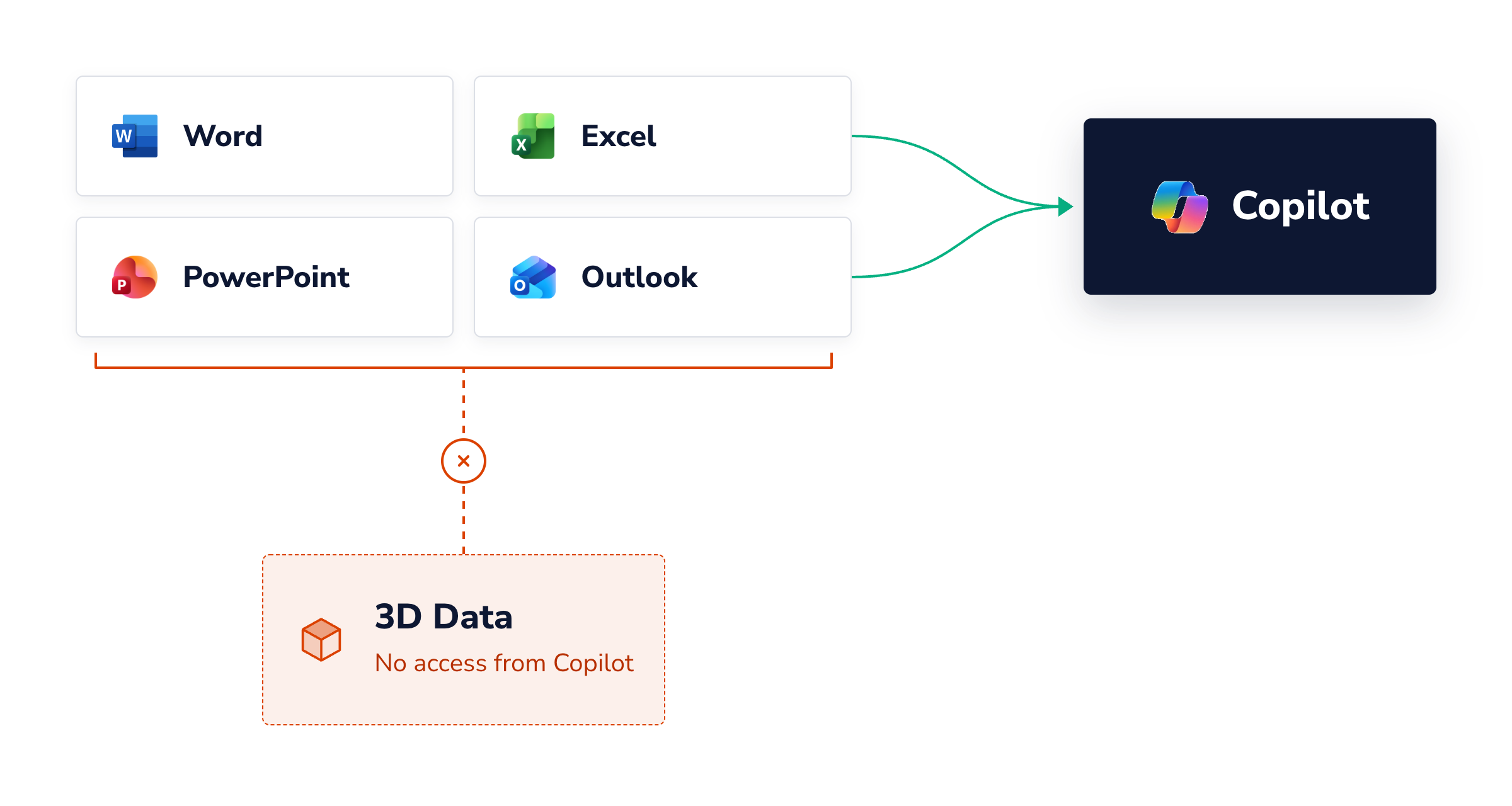
What Copilot can do with 3D data
A few examples of what's possible. Each one combines the 3D model with knowledge your company keeps in Microsoft 365.
Example · Procurement
Price parts straight from your cost sheets
Copilot reads the parts, materials and weights from the 3D model and matches them to your Excel cost structure. Parts without a price get flagged.
A cost estimate in minutes, without exporting a parts list by hand.
Example · Design checks
Check models against the rules you already wrote
opilot reads the rules from Word, measures the model and lists each finding with the part and the rule it breaks. The engineer decides what to fix.
Reviews start from a findings list, not from an empty checklist.

Example · Management presentations
Build the status deck, 3D views included
Copilot takes views of the changed parts from instant3Dhub and puts them into PowerPoint with the key numbers.
No more screenshot sessions before every steering meeting.
Your workflow
Your workflow here
Any process that needs the 3D model and a file in Microsoft 365 can run in Copilot. We build it with you as a skill.
Spare parts for a service case
Weight and dimensions for logistics
Changes between two releases
Technical answers for sales
Set up with Threedy, built on the Copilot you run
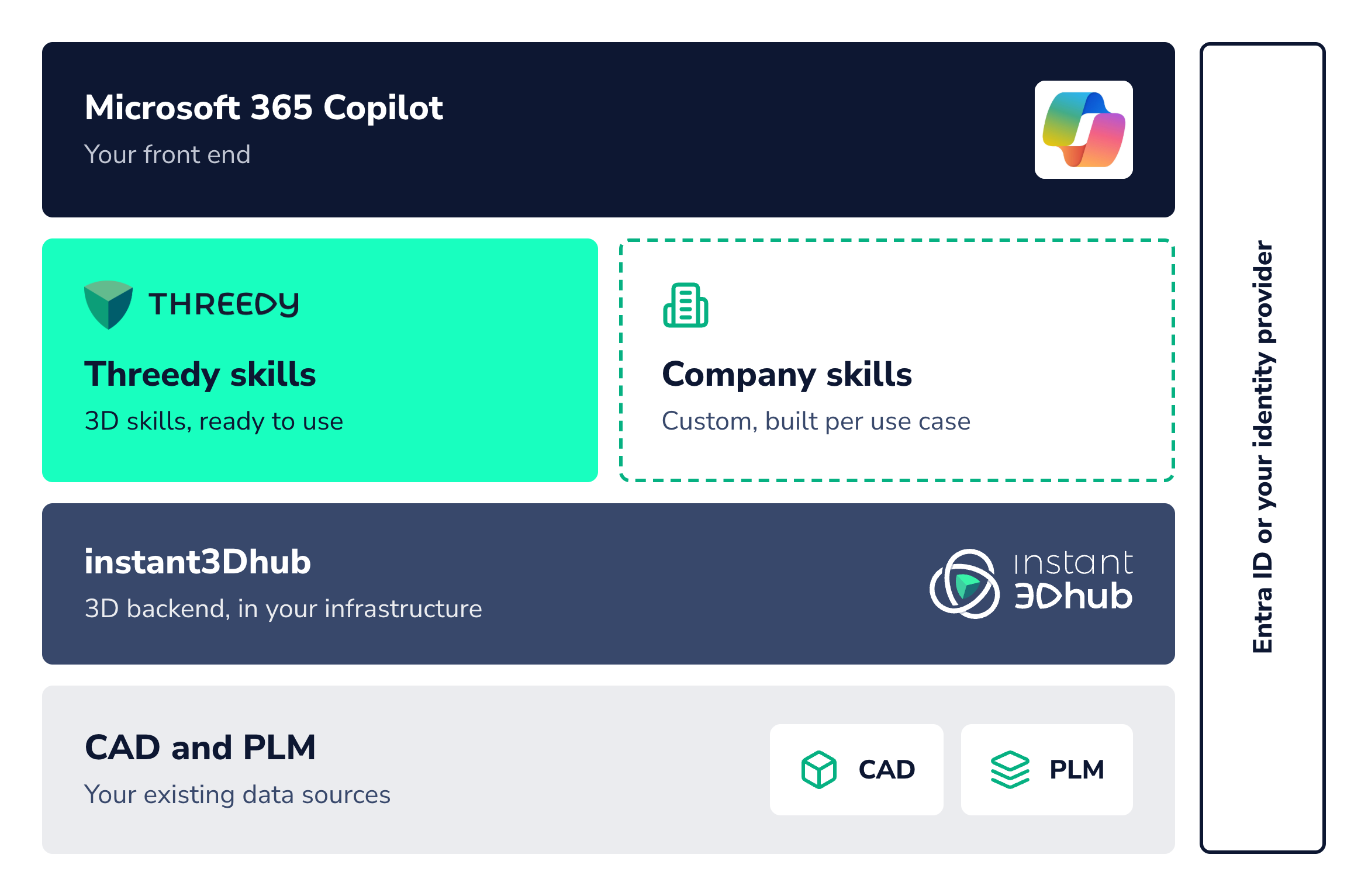
Your Copilot stays the front end. We add the 3D part in four building blocks.
1
Scaffold and expertise from Threedy
A ready agent setup, and our team builds the first use case with yours.
2
Skills for each use case
As part of the setup, we adapt the agent's skills to your workflow: your rules, your files, your process.
3
instant3Dhub as the 3D backend
The interface between Copilot and your 3D data. It connects your CAD and PLM sources and gives Copilot access to product structure, geometry, metadata, PMI and model views, inside your infrastructure.
4
Access control for 3D data
Authentication runs against Microsoft Entra ID or your existing identity provider. Users see only the 3D data they're allowed to see.
Runs on your Copilot licenses
The agent runs on the Microsoft 365 Copilot licenses you already pay for. No separate AI contract for 3D.
Applies to users with a Microsoft 365 Copilot license.
Needs a running instant3Dhub
Already a customer? Then the Copilot connection is a small add-on.
See it on real 3D data
We show the design check and the procurement workflow live in Copilot, on our demo data or on yours under NDA.
Design check in Copilot
The instant3Dhub agent in Copilot
Frequently Asked
Questions
Short answers to what teams usually ask before the first call.
Do we need separate AI licenses for the 3D part?
No. The agent runs on the Microsoft 365 Copilot licenses you already pay for, so there is no separate AI contract for 3D. This applies to users who have a Microsoft 365 Copilot license.
Do we need instant3Dhub to use this?
Yes. The Copilot connection needs a running instant3Dhub as the 3D backend. If you are already a customer, the Copilot connection is a small add-on.
Where does our 3D data stay?
instant3Dhub runs in your infrastructure and connects to your existing CAD and PLM sources. Copilot gets access to product structure, geometry, metadata, PMI and model views through it.
Who can see which 3D data in Copilot?
Authentication runs against Microsoft Entra ID or your existing identity provider. Each user only sees the 3D data they are allowed to see.
Can we see it on our own data?
Yes. We show the design check and the procurement workflow live in Copilot, on our demo data or on yours under NDA.
Start with one workflow
Bring one process that needs 3D and Office files together. In 30 minutes we show you how it runs in Copilot and what your setup needs.
1
30-minute call about your workflow and your Copilot setup
2
Live demo of the closest use case
3
If it fits: a scoped pilot on your data