
%202.webp)
Millions of Parts, in seconds.
Industrial CAD running live globally, in any browser, app, or device.
Stream CAD from your PLM straight to every team that needs it. No data pipelines, no stalled pilots.



In Production At








Instant Streaming
View and explore multi-million part assemblies in the browser
With existing tools, a native CAD file with just a few thousand parts can take minutes to open on even the most expensive workstation. instant3Dhub uses Instant Streaming to split large data into smaller caches, then streams just the data you actually need. Even the most complex data is now viewed instantly, worldwide, and on any device.
Live Links to the Source-of-Truth
Goodbye slow exports, inefficient conversions, and costly data preparation pipelines
Every time you export a CAD file, you create a copy. That copy goes out of date the moment the source changes. With instant3Dhub you connect directly to your Systems-of-Truth like Teamcenter, Windchill and SAP via Connectors. Geometry, Metadata and Business Datastreams live from your PLM or ERP so everyone has the data they need.
Integration & Automation
3D that also reaches the other 95% of your business
Most teams cannot view the 3D data engineering creates. Sales uses PowerPoint, Service uses PDFs, Manufacturing uses screenshots. And your engineers' most used tool? Excel. instant3Dhub puts live 3D in front of every team on laptops, tablets, shop-floor tablets, AR overlays, and VR headsets - through your existing governance layer.
Always up to date
Collaborate, Markup, Validate, Inspect, and Analyze
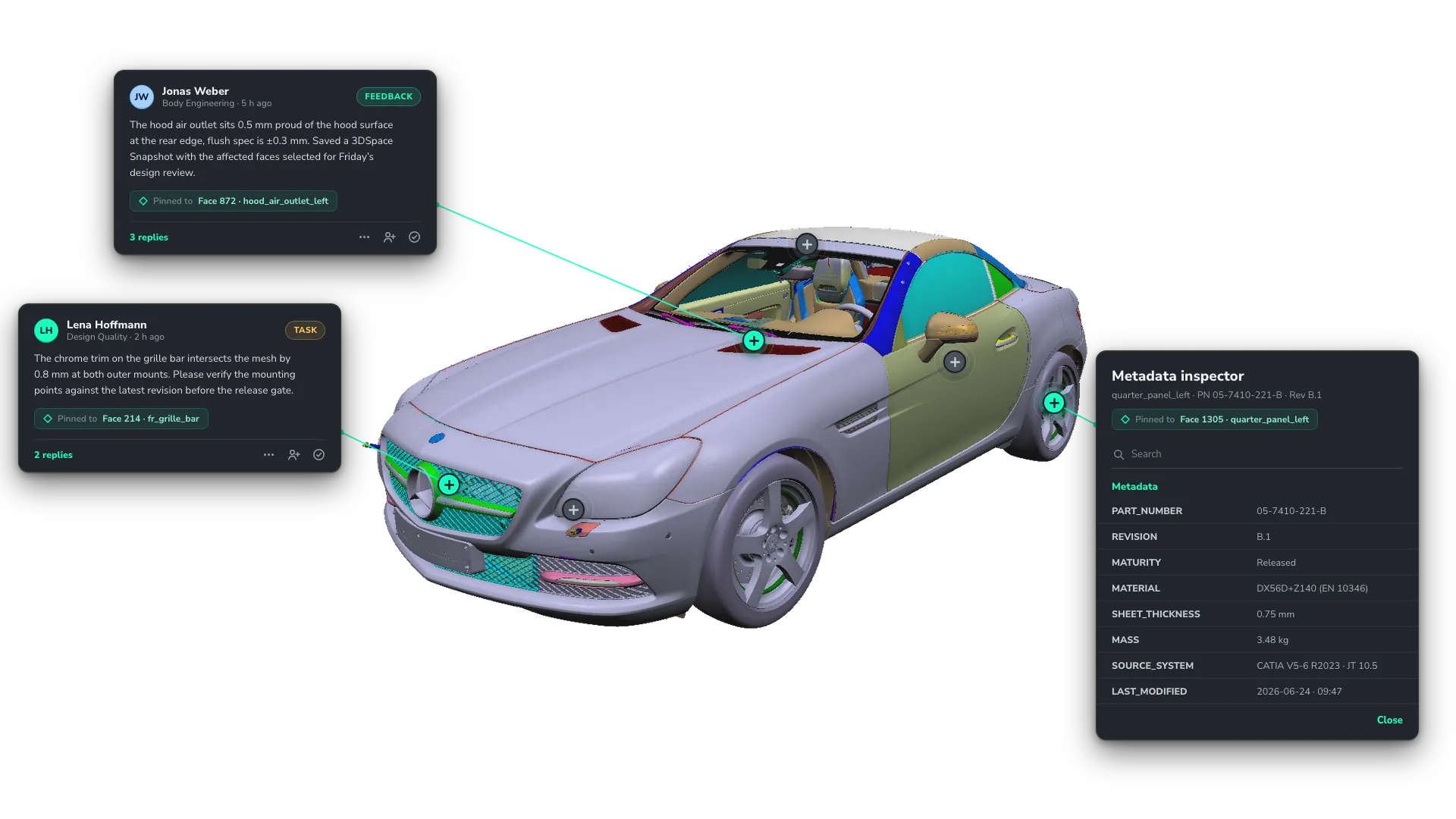
instant3Dhub's 3DSpace is where teams work side by side on live data and stay up to date on the latest decisions: annotate parts, layer business data onto geometry, measure and slice assemblies in the browser, surface every property and PMI.
Flexible APIs & SDKs
3D apps tailored to
the workflows your business already runs on
the workflows your business already runs on
Off-the-shelf native viewers or SaaS-viewers force every workflow through the same interface. instant3Dhub lets each team work with 3D in the interface that fits their job. instant3Dhub brings 3D into every app with APIs, SDKs and developer support for every use case.
99%
Faster load times
Daimler Truck reduced assembly wait time from 30s to near-instant in production.
20+
Years of research
Threedy was founded as a spin-off from Fraunhofer IGD, Europe’s leading research institute for visual computing.
15,000+
Daily Active Users
Across leading OEMs like Stadler, Mercedes-Benz, BMW, and Porsche.
No limit on data size or complexity
Millions of parts are streamed live, without any exports or conversions.
Built for industrial complexity. Designed for everyone who touches it
View
Select
Navigate
Transform
Hide
Style
Highlight & Ghost
Collaborate
Coordinate
Present & Follow
Annotate
Snapshot
Markup
Draw
Trace
Pin
Validate
Measure
Clip & Slice
Check
Inspect
Search & Filter
Read Props & Metadata
Read PMI & Modelviews
Analyze
Coordinate
Overlay Heatmaps
Anchor & Scale
Agentic 3D
Ask
Check
Review
Every team can work with the latest 3D CAD data. For engineers, this means that Monday morning starts at the latest revision of the assembly they’re working on - not at the bottom of an Outlook thread.

Benedict Lubik
Senior Product Manager, Platform & Growth
Every team can work with the latest 3D CAD data. For engineers, this means that Monday morning starts at the latest revision of the assembly they’re working on - not at the bottom of an Outlook thread.
Benedict Lubik
Senior Product Manager, Platform & Growth
Every team can work with the latest 3D CAD data. For engineers, this means that Monday morning starts at the latest revision of the assembly they’re working on - not at the bottom of an Outlook thread.
Benedict Lubik
Senior Product Manager, Platform & Growth
Every team can work with the latest 3D CAD data. For engineers, this means that Monday morning starts at the latest revision of the assembly they’re working on - not at the bottom of an Outlook thread.
Benedict Lubik
Senior Product Manager, Platform & Growth
Every team can work with the latest 3D CAD data. For engineers, this means that Monday morning starts at the latest revision of the assembly they’re working on - not at the bottom of an Outlook thread.
Benedict Lubik
Senior Product Manager, Platform & Growth
Every team can work with the latest 3D CAD data. For engineers, this means that Monday morning starts at the latest revision of the assembly they’re working on - not at the bottom of an Outlook thread.
Benedict Lubik
Senior Product Manager, Platform & Growth
Multi-site reviews happen on one persisted 3DSpace, so colleagues, suppliers, and customers work in the same context without any manual file sharing
Benedict Lubik
Senior Product Manager, Platform & Growth
Multi-site reviews happen on one persisted 3DSpace, so colleagues, suppliers, and customers work in the same context without any manual file sharing
Benedict Lubik
Senior Product Manager, Platform & Growth
Multi-site reviews happen on one persisted 3DSpace, so colleagues, suppliers, and customers work in the same context without any manual file sharing
Benedict Lubik
Senior Product Manager, Platform & Growth
Multi-site reviews happen on one persisted 3DSpace, so colleagues, suppliers, and customers work in the same context without any manual file sharing
Benedict Lubik
Senior Product Manager, Platform & Growth
Design reviewers and field teams annotate feedback and ideas, identify and pin risks or metadata - directly on the part, so context travels with the geometry instead of dying in emails and screenshots
Benedict Lubik
Senior Product Manager, Platform & Growth
Design reviewers and field teams annotate feedback and ideas, identify and pin risks or metadata - directly on the part, so context travels with the geometry instead of dying in emails and screenshots
Benedict Lubik
Senior Product Manager, Platform & Growth
Design reviewers and field teams annotate feedback and ideas, identify and pin risks or metadata - directly on the part, so context travels with the geometry instead of dying in emails and screenshots
Benedict Lubik
Senior Product Manager, Platform & Growth
Engineering, Manufacturing and QA measure, section and run checks on shared, live data so validation happens before metal gets cut, without paying for another CAD seat - or waiting for one to free up.
Benedict Lubik
Senior Product Manager, Platform & Growth
Engineering, Manufacturing and QA measure, section and run checks on shared, live data so validation happens before metal gets cut, without paying for another CAD seat - or waiting for one to free up.
Benedict Lubik
Senior Product Manager, Platform & Growth
Engineering, Manufacturing and QA measure, section and run checks on shared, live data so validation happens before metal gets cut, without paying for another CAD seat - or waiting for one to free up.
Benedict Lubik
Senior Product Manager, Platform & Growth
Engineering, Manufacturing and QA measure, section and run checks on shared, live data so validation happens before metal gets cut, without paying for another CAD seat - or waiting for one to free up.
Benedict Lubik
Senior Product Manager, Platform & Growth
Service, procurement, and QA teams search the BOM and read engineering metadata directly on the part, so the source of truth is one click away instead of a ticket to engineering.
Benedict Lubik
Senior Product Manager, Platform & Growth
Service, procurement, and QA teams search the BOM and read engineering metadata directly on the part, so the source of truth is one click away instead of a ticket to engineering.
Benedict Lubik
Senior Product Manager, Platform & Growth
Service, procurement, and QA teams search the BOM and read engineering metadata directly on the part, so the source of truth is one click away instead of a ticket to engineering.
Benedict Lubik
Senior Product Manager, Platform & Growth
Quality, service, and operations teams compare what is built with what is designed. Faster, better decisions improve your time-to-market and reduce quality issues.
Benedict Lubik
Senior Product Manager, Platform & Growth
Quality, service, and operations teams compare what is built with what is designed. Faster, better decisions improve your time-to-market and reduce quality issues.
Benedict Lubik
Senior Product Manager, Platform & Growth
Quality, service, and operations teams compare what is built with what is designed. Faster, better decisions improve your time-to-market and reduce quality issues.
Benedict Lubik
Senior Product Manager, Platform & Growth
Converse with the 3DSpace and your data or hand work to Agents, so throughput grows without adding headcount. Users stay in the loop and retain control, decision making and cycle times are accelerated
Benedict Lubik
Senior Product Manager, Platform & Growth
Teams talk to the 3DSpace and hand recurring work to SME agents, so throughput grows without adding headcount and humans stay in the loop on every decision.
Benedict Lubik
Senior Product Manager, Platform & Growth
Teams talk to the 3DSpace and hand recurring work to SME agents, so throughput grows without adding headcount and humans stay in the loop on every decision.
Benedict Lubik
Senior Product Manager, Platform & Growth
Success Stories

Porsche brings the Digital Twin to the workshop with instant3Dhub
By streaming the Taycan's original CAD data to workshops worldwide, Porsche built the first realtime 3D and AR service solution, replacing page-by-page manuals with interactive step-by-step guidance.
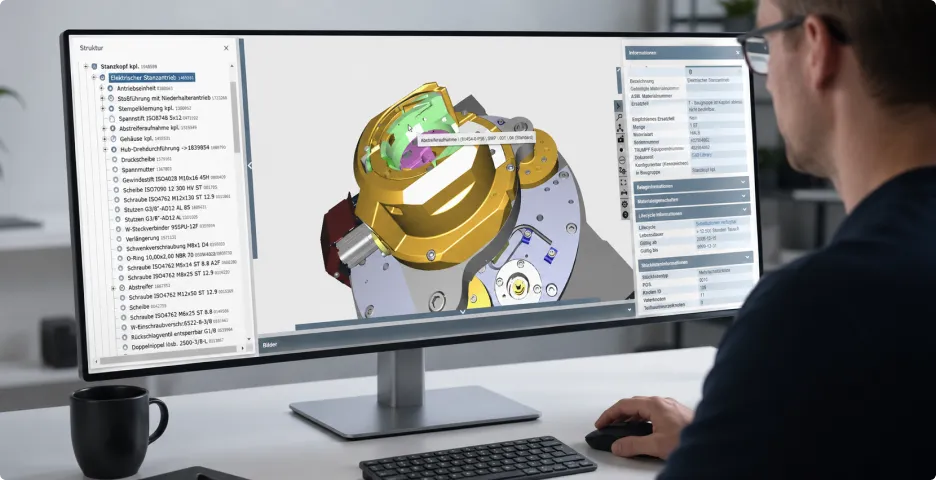
TRUMPF visualizes 250,000+ machines on demand with instant3Dhub
TRUMPF's "Digital Machine File" streams 3D data to the point of service across 250,000+ machines and 1,700+ users, giving service, sales, and simulation teams one single source of truth.
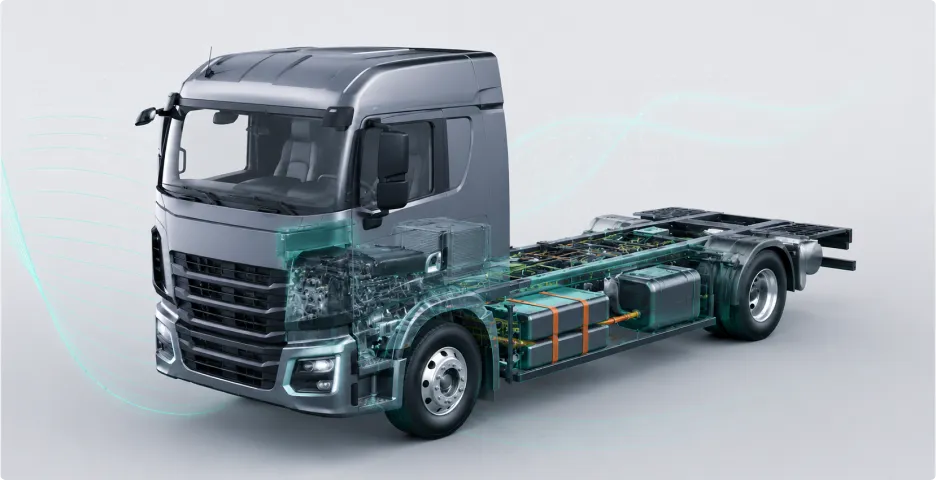
Daimler Truck North America reduces visualization waiting time by 99% with instant3Dhub
By integrating instant3Dhub, Daimler Truck cut assembly load times by almost 99%, from around 30 seconds to instant, on any structure.
Get Started
Pick your path
Standardized
Use a Threedy Solution
Unified Access to 3D Engineering Data
Don't want to build? Deploy a packaged Threedy app, or a tailored solution built by Threedy or a partner. Design review, digital work instructions, customer demos - live in days, not months.
Pre-configured for specific use cases
Rapid deployment and onboarding
Built on the instant3Dhub platform
Customizable to your workflow
Explore Solutions


Custom
Build with instant3Dhub
Embed 3D in your product, or build a custom application
Use instant3Dhub as your 3D infrastructure. Embed viewers in your portals, build custom applications on webvisAPI, Unreal Plugin, JxVis, or MCP Server; your team ships the experience.
Full SDK access (web, Unreal, JVM, MCP)
White-label and embed in your portals
Connect to your data and business logic
UI & UX tailored to your needs
Talk to an Expert
Frequently Asked Questions
Explore answers to common questions about instant3Dhub, from CAD support to deployment.
What exactly is instant3Dhub?
instant3Dhub is the Instant Streaming Platform that brings your CAD and engineering data live to every team, on every device, without exports or CAD seats. It connects your PLM, ERP, and the rest of your business so anyone, from design to service, works on the same live 3D in a browser. Think of it as the connective tissue between your engineering source of truth and the people who need to act on it.
Who is instant3Dhub for?
For manufacturers whose engineering data is locked in CAD and PLM today, and whose downstream teams, manufacturing, QA, service, sales, procurement, suppliers, customers, all need a way in. Engineers continue to build in their authoring tools but collaborate with instant3Dhub; everyone else gets a live, governed view of the same data in a browser. Used today by leading engineering enterprises, from automotive, rail and energy to heavy equipment manufacturers.
What CAD formats are supported?
Every current 3D format used in industry, native CAD (CATIA, NX, Creo, SolidWorks, Inventor, Solid Edge), JT, STEP, IGES, plus scan data and point clouds. Enriched with business data from your Productivity Tools, ERP, MES, or any system that exposes an API.
How does instant3Dhub integrate with existing systems?
Through connectors to the systems your teams already run. PLM and PDM (Teamcenter, Windchill, 3DEXPERIENCE). Data ecosystems (Catena-X), Work management (Jira), Productivity (Microsoft Teams). Each connector lets you open 3D in context, link tickets to the exact part, share a 3DSpace as a Teams card, and govern access through the upstream system instead of duplicating it. No duplication, no expensive conversion pipeline and no exports where you end up losing data.
What is a 3DSpace?
A 3DSpace is where your 3D data meets the business data around it, PLM, PMI, BOM and ERP at runtime. It's persisted, multi-user, and device-agnostic. Open it today in a browser, reopen it tomorrow on an iPad or in Unreal, and the same colleagues, the same markups, the same measurements are still there.
How does instant3Dhub handle million-part assemblies?
Instant Streaming sends only the geometry the camera needs, the moment it needs it. If necessary, Smart Rendering splits the work between your client and remote CPU/GPU services, so a laptop in the field and a workstation in the studio open the same assembly in seconds. No exporting, no conversion, no waiting for a CAD seat to free up.
What hardware is required?
The hardware your teams already use. A modern browser on a laptop, tablet, or phone is enough for most users. AR runs on iOS, VR on common HMDs. The heavy lifting happens server-side, so 5 year old, entry-level laptop can open assemblies that would crash a CAD workstation. No specialized GPUs, no proprietary input devices, no thick-client install.
What is Agentic 3D?
Agentic 3D treats the platform as the host for AI agents that work with your engineering data, not a chatbot bolted on. Ask the 3DSpace a question in natural language. Trace requirements to the parts they constrain. Check manufacturing feasibility. Automate recurring reviews. A human still signs off on every decision. In active development with select customers today.
What does instant3Dhub replace in my stack?
Thick-client viewers when most of your users just need to quickly explore the last version of their assembly. Conversion pipelines that bake CAD into game assets or PDFs, pipelines that end of cutting out all the detail your teams need, pipelines that cost you 6-7 figures a year. Per-team siloed tools for measurement, markup, comparison, AR, and supplier collaboration. One platform that brings live engineering data to all your teams.
Is my data secure, and where does it run?
Your CAD never leaves your perimeter. instant3Dhub deploys on-prem, in your private cloud (AWS, Azure, GCP), hybrid, or air-gapped. You already have systems that govern your business. instant3Dhub-based apps inherit them rather than re-implementing them.
How long does implementation take?
Implementation is typically fast and incremental. Initial setups for a first use case can often be completed within a few days or weeks, depending on integration depth and internal approvals. Test installations are often up and running within 48 hours. Since Threedy builds on existing systems and standards, customers can start small and scale over time without disrupting ongoing operations. If this is not possible or desired, our Customer Success team comes into play.
Highly complex multi-CAD environments with customized end-user applications or extensive integrations into existing applications can sometimes take up to three months. However, when delays do occur, they are very often due to idle time caused by waiting for external suppliers, vacation or holiday periods, or the unavailability of necessary resources that get lost in day-to-day business.
For this reason, we attach great importance to professional project management with jointly agreed, realistic milestones and a partnership-based approach involving all parties. Our Professional Services Team and Subject Matter Experts are always available to respond to or take on your specific needs and look forward to working with you.
How do I get started with instant3Dhub?
You can choose from two paths. Either embed instant3Dhub into your own existing or new app via the SDKs (webvisAPI, jxvis, iOS SDK, Unreal Plugin, MCP Server) or talk to a solutions architect for a guided pilot on your data with one of our existing solutions. Most pilots start with one team and one workflow, then expand.
Stay Updated on the Product
Our product newsletter keeps you informed about new releases, experimental features, how-to guides, and more. Whether you’re a seasoned user or just getting started, you’ll gain valuable insights to enhance your workflow and make the most of instant3Dhub