

Releases
March 16, 2026
·
5
min read

Threedy releases instant3Dhub 3.10

instant3Dhub 3.10 introduces new features and major improvements. We're also sharing a preview into 2025 and 3.11 as well as some other exciting changes surrounding our product!
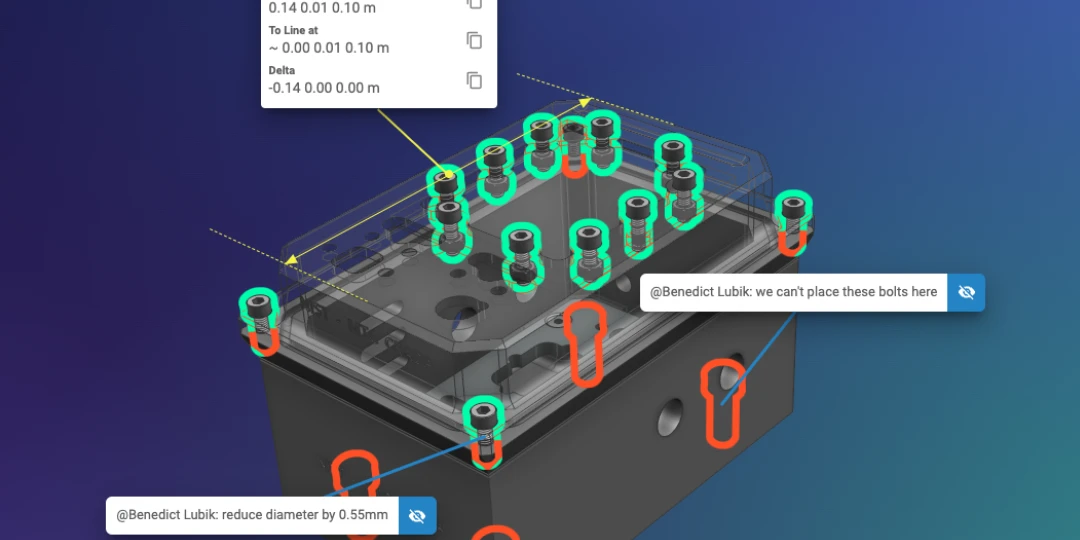
instant3Dhub 3.10 introduces brand new set of functionalities: New Features and Capabilities

Highlight parts with the ‘ghosted’ property

Sometimes, you might want to quickly locate specific parts, especially within larger models. In the past, if the specific part was located deep in a complex model, this could be a frustrating experience. By splitting the scene into fore- and background, our new, experimental “ghosted” property will improve the location and selection of specific parts. In short, the user will get the feeling of a superhero ‍vision with this new feature!

Add guidance to parts with the ‘outline’ property

Sometimes, you might want to highlight the location of a specific (selected or unselected) part, especially within larger models. With the new, experimental "outline" property, we are introducing the functionality to highlight the outline (outer silhouette) of a specific part. This is super useful if it’s a very small part in a large model or the part is occluded by other parts. Figuratively speaking, parts are given a halo effect.

Faster XR development cycles with new XRPlaybackAPI

With the XR Playback API, recorded frame sequences can be played back anywhere, removing the need to visit the physical location for each test iteration. The recordings can be used to test new features easily or increase development iteration speed without the need of having a physical device available.

Interested in Augmented Reality (AR) ? Check out our iOS SDK.

Take control of the camera image quality

Added two new settings for XR configuration that allow to adapt compression and resolution to your use case, e.g. if the image quality of the AR Image is too low to detect certain features in the image. For some use cases a higher quality of the background image is required.

Detailed Changelog

Head to the documentation for the extensive breakdown of all changes and fixes.

Documentation Portal

Major Improvements

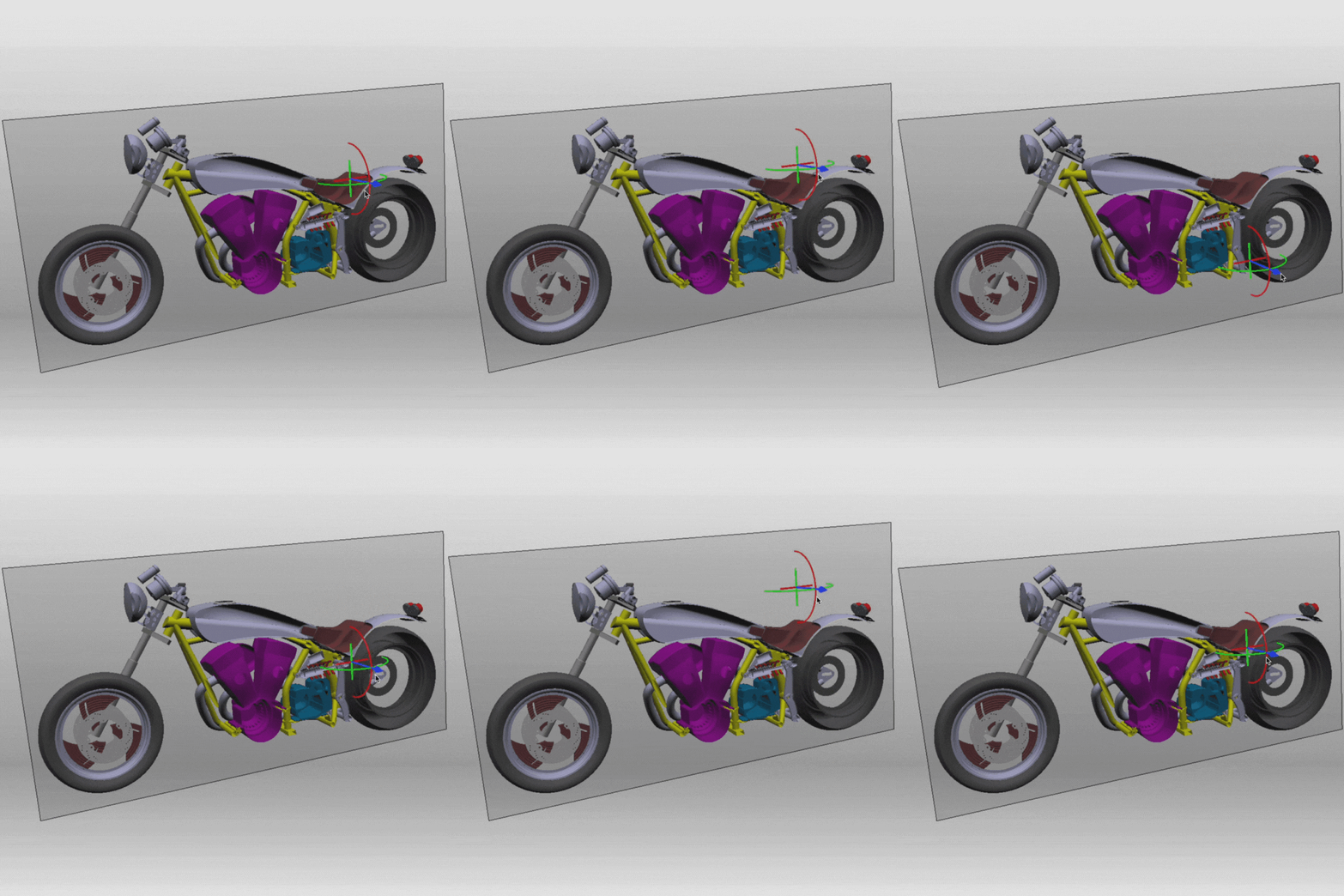
Improved Clipplane Gizmo

To allow for easy repositioning of the clipplane gizmo, we've introduced additional handles and dimensions for said gizmo that allow to move it on the x and y plane of the clipplane. They can be seen as a "+" on the clipplane in the video.

Simplified Model Alignment for Augmented Reality Setups

Easily set up AR tracking with the new AR Turntable feature. This mode aligns the model's up vector with gravity, allowing for intuitive left-right swipes or mouse drags to adjust orientation along a single axis. Perfect for objects with a stable ground reference, AR Turntable eliminates complex multi-axis adjustments, making model setup quick and efficient on both desktop and mobile devices.

Simplified cluster management for instant3Dhub

instant3Dhub utilizes Kubernetes, a leading container orchestration platform, to efficiently manage deployments and ensure optimal scalability across diverse workloads. With Kubernetes, automatic scaling can be configured to dynamically allocate resources as user demand fluctuates, keeping everything running smoothly.

Building on this, we’ve enhanced cluster management by extending the values.yaml configuration with options to define node selectors and affinities for each service pod. This gives administrators greater flexibility to control resource allocation, enabling instant3Dhub to place each service on the most suitable node type. The result is improved performance and resource efficiency, meeting the high-performance demands of real-time 3D applications.
For the Bold Innovators: Introducing Hub Mesh & 3D Space Transfer

Meet ‘Hub Mesh’—our vision for connecting multiple instant3Dhub instances to enable seamless resource sharing, streamlined authentication, and enhanced data allocation and provisioning crossing departments or infrastructure locations.

Launching this vision, version 3.10 introduces ‘3D Space Transfer,’ a secure, on-demand solution to transfer a 3D Space across instant3Dhub installations. This feature streamlines data access across boundaries making engineering and manufacturing data more accessible and bolstering reliability in offline or low connection scenarios with robust authorization control.

3D Space Transfer marks just the beginning, as our long-term goal for 'Hub Mesh' focuses on expanding resource and compute sharing to drive greater efficiency and scalability. Curious about what Hub Mesh could bring to you? Let’s explore together!

3.10 Migration Guide

Preview: instant3Dhub 3.11

instant3Dhub 3.11 will bring new Markup and AR Features

On the webvisAPI side, we aim to include new Drawing Modes for drawing basic shapes like rectangles and ellipses and for scaling, rotating and erasing drawings. We are also currently reworking the QueryAPI for improved performance and usability and aim to have at least an experimental version of the changes in 3.11. Furthermore we will add new types of measurements to the MeasurementAPI.

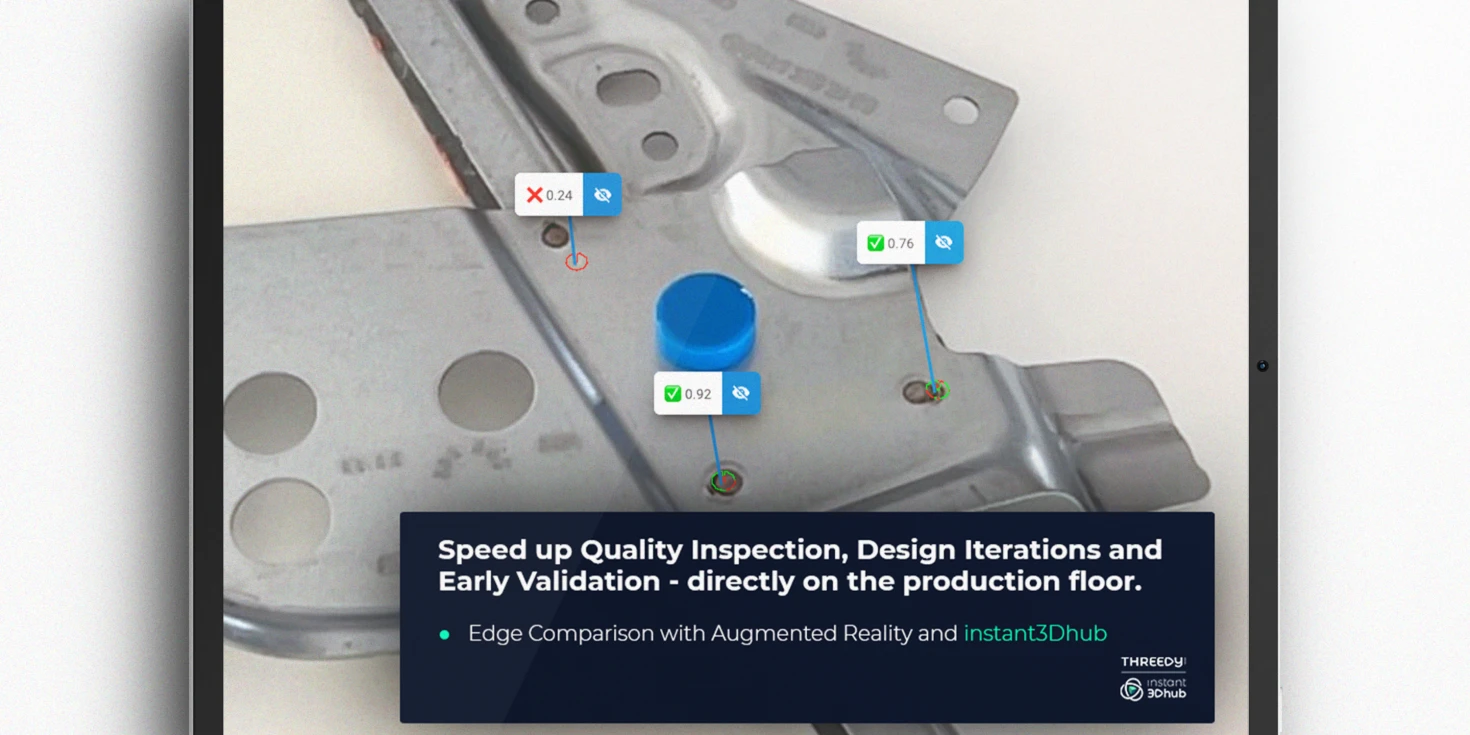
For Augmented Reality (AR), 3.11 will include a functionality for target-actual comparisons and performance improvements. Also, stay on the lookout for new releases for our SDKs for Unreal, Java and iOS.

Want to participate or learn more? Shape the future of industrial 3D and instant3Dhub and have a coffee with our Product Team.
Developers take a look!

Introducing the instant3Dhub Nightly Release

Starting today, we are happy to introduce a Nightly Release for instant3Dhub that brings you closer than ever to our newest inventions! Due to the velocity of this release channel, we do however explicitly discourage from using this release for any productive environments.

To use the Nightly Release, head to

Introducing Feature Stages

Starting with 3.10, we are making changes to our internal CI/CD pipeline and slowly rolling out feature staging over the coming months. Be on the lookout for Experimental or Preview labels that mark rather volatile, under development functionalities of instant3Dhub. But aren't those the most fun? 👀

Stay Connected!

Benedict Lubik - Product Manager

📅 Want to chat about industrial 3D, instant3Dhub or other collaborations?

Book a meeting with me!

instant3Dhub Product Newsletter

The Newsletter is your source for the latest updates, tips, and insights related to New Released Features, Experimental Previews, How-Tos, and many more. Whether you're an experienced user or just getting started, our newsletter is designed to keep you informed, inspired, and engaged.
Subscribe now!

Share this article:

Read our latest blogs

View all blog
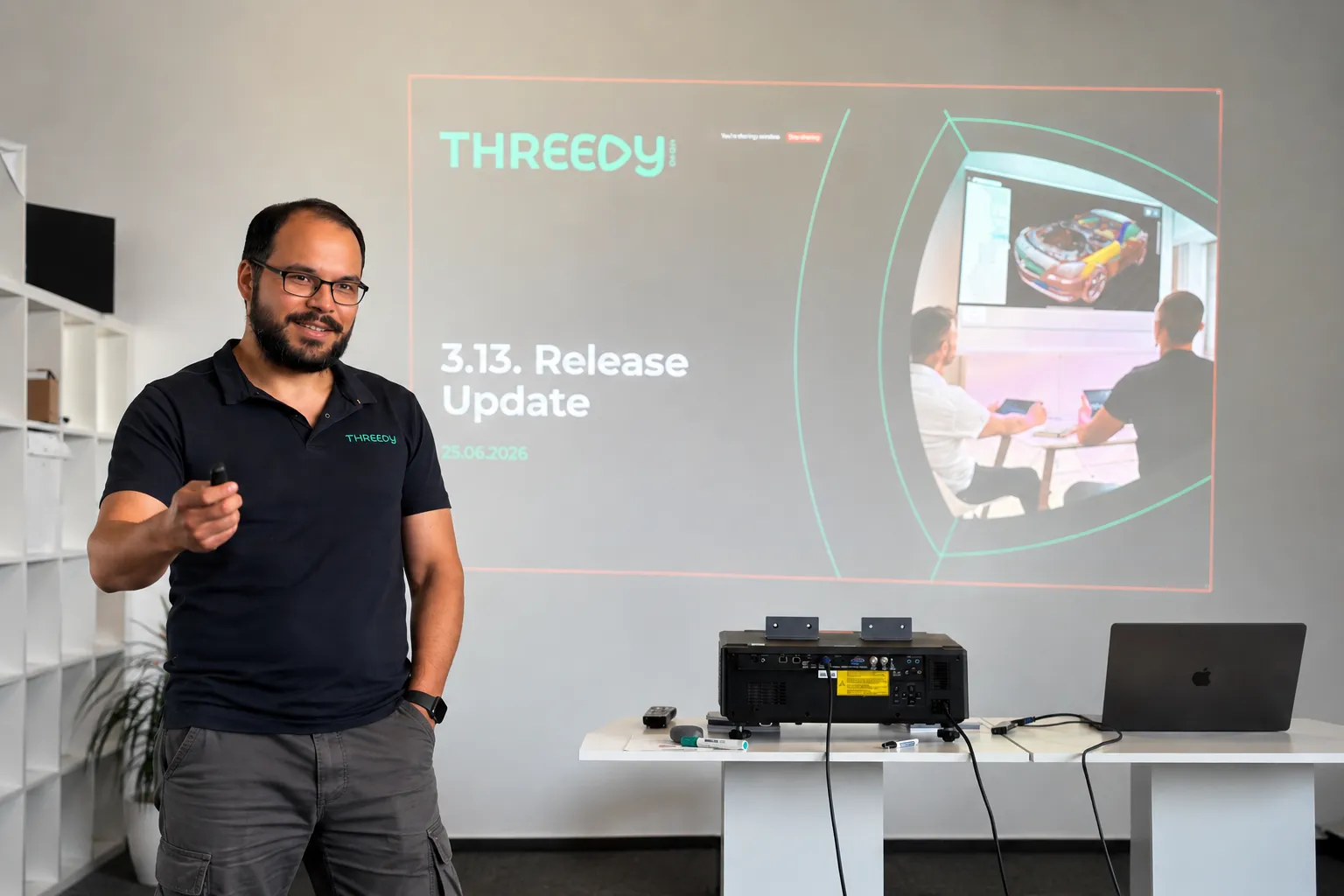
What's New in instant3Dhub 3.13: The AI Edition

Every AI conversation right now eventually lands on the same question: what does this actually change about how people work? For 3D data, 3.13 is our first answer.

The headline feature is the MCP server. It's experimental, it's built into every deployment, and it's the first time an AI assistant can talk directly to a 3DSpace - not to a description of the data, but to the 3D data itself.

Here's what that means in practice, and what else changed in this release.

AI assistants that work with your CAD data

The MCP server ships with every instant3Dhub 3.13 deployment. No separate setup. You connect with an MCP-compatible AI assistant - Claude, Cursor, VS Code Copilot, others - point it at a 3DSpace, and it can start working with your 3D data.

What it can do once connected:

  • Query and navigate the product structure
  • Read and write node properties - visibility, color, metadata
  • Transform nodes: position, rotation, scale
  • Create, update, and remove annotations
  • Define and modify clip planes
  • Take measurements: distances, volumes, surface areas

That means prompts like "find all parts where the material is set to aluminum" or "hide everything except the engine subassembly" work as you'd expect. The assistant isn't approximating based on a text description. It's querying the actual scene.

One thing worth being explicit about: MCP tool results - node names, metadata, measurements, scene structure - are sent to the LLM as part of the conversation. The LLM provider never connects to your network, and 3D mesh geometry is not transmitted. If your models contain classified metadata, check with your security team before connecting an external AI assistant.

We're shipping this as experimental. That means it's ready to build on, but it can change quickly and we want your feedback on it.

In 3.13, we've reworked the Query API to support runtime state and nested logic. This is the infrastructure the MCP server sits on — and it also matters directly for developers building on top of instant3Dhub. Less friction, faster results, fewer edge cases.

The 3DSpace as a more manageable

The 3DSpace is where teams work together on 3D data - synchronously and asynchronously, without passing files. 3.13 makes it easier to link, share, and operate:

  • Custom space IDs - open a space with a user-defined identifier instead of an auto-generated one
  • Define when a 3DSpace gets fully deleted with retention policy via values.yaml
  • Multi-user apps with MemberAPI integrated, legacy XRMembers removed
  • SessionAPI removed - fully migrated to SpaceAPI; if you're on an older integration, now is the time to update

Other things worth knowing about:

Performance: Lower cloud costs and faster performance. GPU memory usage is down and rendering budgets are more predictable, so you get more out of less hardware. The experimental CPU-based culling can take load off the GPU entirely, cutting the need for expensive GPU instances. Large models render faster, and the GUI freezes some of you hit on heavy assemblies are fixed.

Orientation: Easier orientation in complex scenes. The navigation cube is now HTML-based and shows coordinate axes, so it's quicker to stay oriented when you're navigating large, deeply nested assemblies.

Authorization: Less setup in nested structures. Parent-based authorization is now an option alongside authorizing each node individually. Let children inherit authorization from their parent and you skip a separate auth request for every node. Fewer requests and less overhead, especially in deep hierarchies.

Interoperability: More of your Teamcenter data comes through cleanly. Better handling of JT content (including threaded features) plus basic support for PLM XML and JT assemblies exported from Teamcenter.

Usability: Measurement and search, faster to use. Measurement mode is now one click from the toolbar. In double measurement, your first target stays highlighted so you don't lose your place. And the search bar gets select-all and clear, handy when you're working through long result lists.

Operations: Simpler ops and deployment. Helm upgrades now restart affected services automatically, external database setups no longer need Ansible, and serial keys can be managed through Kubernetes secrets. Less manual work to deploy and maintain.

Security: We fixed XSS vulnerabilities in the Print Manager, annotations, and webvisUI notify functions.

July 1, 2026
·
4
min read
Beyond CAD: Where AI for 3D Data Gets Interesting

AI for 3D data is coming to industrial workflows

This is about AI agents that can work with 3D data to handle tasks that humans currently do. Not tools that help you design faster, but agents that take on whole work steps: reviewing, interpreting, communicating, reporting. The same shift we've seen in text-based knowledge work like legal, now entering spatial data.

This matters because 3D data in industrial companies isn't just sitting in CAD tools. It moves. It goes from design to manufacturing. It goes from engineering to sales. It goes from development to the customer and back. At every handoff, someone has to translate that 3D data into something another person or team can act on. That translation work is manual, expert, and time-consuming. That's the target.

June 4, 2026
·
6
min read
Cross-Company 3D Collaboration Gets a Standard

The Catena-X Geometry Kit

The Catena-X Geometry Kit is a standard for cross-company 3D geometry exchange, now part of Tractus-X. It defines how to describe, publish, and consume 3D geometry across company boundaries building on the Catena-X architecture and advantages.

Building on Catena-X, the Geometry Kit enables sharing of 3D geometry data in a dataspace between companies: a setup where multiple organizations share data in a controlled, decentralized, and interoperable way, without giving up ownership of it. The Eclipse Dataspace Connector (EDC) is the standardized interface each participant uses to communicate across that space. Geometry is published with a policy attached, scoped to a specific project and partner, with an expiry date. That policy is enforced technically, not just agreed contractually. And because it's a shared standard, there's no bilateral integration to build per partner and others can join the dataspace with low effort.

How It Works in Practice

A supplier publishes integration-relevant geometry through their Digital Twin Registry. The OEM accesses it through their own application interfaced via the EDC. When there's an update, the partner accesses the new version through the same channel. No stale copies sitting on their side to track down. When the project closes, the supplier revokes the policy and access ends automatically.

Use Case Overview as presented on Prostep IVIP 2026

This also handles heterogeneous PLM and CAD tooling without custom integration per project. Standardized interfaces do that work once, at the infrastructure level. If a third organization needs to join mid-project, they connect to the network without requiring changes from anyone already in it.

One thing worth being upfront about: your tooling vendor needs to implement the EDC interfaces. The standard only works if the tools in the room support it.

Where instant3Dhub Fits

instant3Dhub implements the Geometry Kit on the consumer side. Geometry published via Catena-X streams directly into instant3Dhub for review, clash detection, DMU checks, and collaborative sessions across organizations, without export or conversion.

We demonstrated this end to end at the prostep ivip Symposium with Schaeffler. Try the demo in the browser. If your organization is evaluating adoption, book a call or reach out at product@threedy.io.

Hannes Krug, Senior Product Manager & AI-Lead at Threedy GmbH

April 8, 2026
·
2
min read