

Releases
March 16, 2026
·
4
min read

Threedy releases instant3Dhub 3.11

Today we’re excited to launch instant3Dhub 3.11, bringing substantial new features, significant improvements, and critical fixes. This update enhances your interactive and immersive 3D applications and your experience as a developer when building them. This update is packed with new tools to make your 3D workflows more efficient, immersive and insightful.
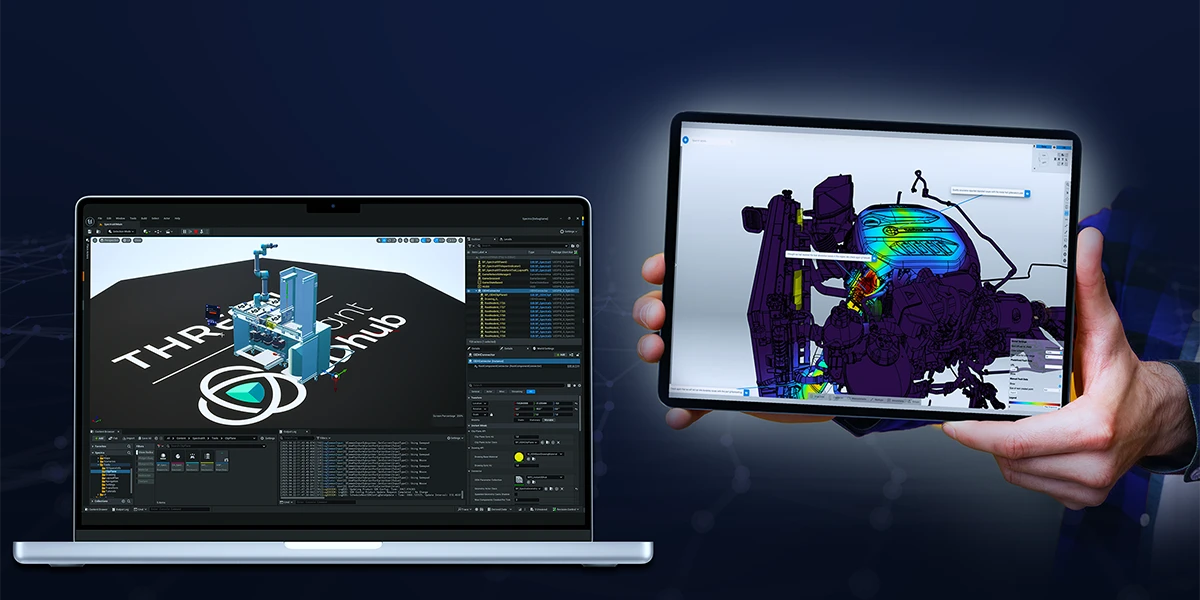
This release includes features you’ve requested plus performance boosts and quality upgrades. We thank our customers, partners, early adopters and the entire Threedy Team for their support in this release. We take pride in the collaboration within our instant3Dhub community and look forward to more innovations together. As always, head to our repository to get the latest images or to our documentation for the full changelog. To see what we're exploring and developing next, check our open Product Talks.

Download via Repository    Changelog    Talk to the Product Team

New Features

One of the most visible additions to webvis in 3.11 are the new drawing modes and shapes. Add Shapes and freehand sketches directly onto 3D models in instant3Dhub. Drawings can now be scaled, rotated, erased and adjusted easily. Collaboration and documentation is now easier than ever, just quickly add a sketch to your model. What shape or functionality for drawings should we add next?

Another major highlight is the powerful upgrade to our MeasurementAPI, which now makes it significantly easier and more flexible to build advanced use cases. You can now directly view and create detailed intersection results - including curves - as both outputs and inputs of your measurements.

Among the new features, you will also find several tagged as experimental. Definitely try them out and experiment to see how these unlock new capabilities for your 3D apps:

  • Added a new XRTextureScanshot API which maps real-world camera data onto the 3D model, enabling users to instantly identify and address quality deviations. Scan hardware and create high-quality representations directly with instant3Dhub – perfect for documenting real-world conditions and comparing what is vs. what should be.
  • Added new XR surface anchoring method for placing 3D models into real-world spaces. Surface-aware anchoring lets you position models accurately, locked precisely onto surfaces such as floors, walls or tables.
  • Added a new requestXRAutoDetectScores feature to the ViewerXREdgeCompareAPI, automating and improving the accuracy of physical product quality validation. Engineers and developers can now automatically detect geometric deviations directly in the viewer.
  • Added new ViewerHeatmapAPI to seamlessly integrate real-time, interactive heatmaps into 3D apps and engineering workflows. By overlaying complex data directly on 3D models, engineers can analyze performance metrics, detect anomalies, and optimize designs – without leaving their familiar environment. Built for scalability, customization, and efficiency, this API unlocks new ways to visualize engineering insights.
  • Added new MaterialAPI that allows for the creation and management of more realistic materials in instant3Dhub. You can now make your CAD data look more metallic or plastic.

New Unreal Plugin and Updates to JxVis and iOS

We’re simultaneously releasing our first public Unreal Plugin that enables you to bring your CAD and business data into the Unreal Engine, e.g. for Virtual Reality, without any data reduction or preprocessing. Additionally, we’re releasing updates to our Java SDK “JxVis” and our iOS SDK. The iOS App has also received some stability and performance improvements.

instant3Dhub iOS App

Performance Enhancements

  • Improved the cache cleaning UX of the Admin interface by showing progress.
  • Improved QueryAPI performance when querying over a large set of elements.
  • Improved license checking performance.
  • Improved transparency rendering.
  • Added an automatic transcoding retry limit to prevent queue blocking.
  • Improved single measurement precision.

Infrastructure Improvements

While our Usage Based Pricing Model comes with a long list of benefits, manually having to export and send over Usage Reports isn’t one of them - for now. With 3.11 we’re releasing the long requested ability to automate the whole License-Usage Reporting Cycle. Simply provide a serial key via your helm chart installation and instant3Dhub handles the rest.

Other highlights include:

  • Introduced a new setting to allow configuration of server side static HTTP response headers, enabling configuration of features such as HSTS.
  • Introduced a new setting to allow configuration of separate storage classes for ReadWriteOnce and ReadWriteMany volumes.

Getting Started with 3.11

As always, head to our repository to get the latest images or to our documentation for the full changelog. When upgrading or migrating to 3.11, it is mandatory to configure your serial key via the Helm chart or offline license server configuration. Reach out to your Threedy Contacts or use our support desk if you require a serial key.

We’re excited to see how you will use instant3Dhub 3.11 in your apps. Happy innovating!

Repository

Documentation

Support

instant3Dhub Product Newsletter

The Newsletter is your source for the latest updates, tips, and insights related to New Released Features, Experimental Previews, How-Tos, and many more. Whether you're an experienced user or just getting started, our newsletter is designed to keep you informed, inspired, and engaged.

If you have questions about enabling a 3.11 feature in your environment or want a personalized demo for your team, let’s talk! We’re here to ensure you unlock the full potential of your 3D data.

Talk to an Expert     Subscribe now
Share this article:

Read our latest blogs

View all blog
What's New in instant3Dhub 3.13: The AI Edition

Every AI conversation right now eventually lands on the same question: what does this actually change about how people work? For 3D data, 3.13 is our first answer.

The headline feature is the MCP server. It's experimental, it's built into every deployment, and it's the first time an AI assistant can talk directly to a 3DSpace - not to a description of the data, but to the 3D data itself.

Here's what that means in practice, and what else changed in this release.

AI assistants that work with your CAD data

The MCP server ships with every instant3Dhub 3.13 deployment. No separate setup. You connect with an MCP-compatible AI assistant - Claude, Cursor, VS Code Copilot, others - point it at a 3DSpace, and it can start working with your 3D data.

What it can do once connected:

  • Query and navigate the product structure
  • Read and write node properties - visibility, color, metadata
  • Transform nodes: position, rotation, scale
  • Create, update, and remove annotations
  • Define and modify clip planes
  • Take measurements: distances, volumes, surface areas

That means prompts like "find all parts where the material is set to aluminum" or "hide everything except the engine subassembly" work as you'd expect. The assistant isn't approximating based on a text description. It's querying the actual scene.

One thing worth being explicit about: MCP tool results - node names, metadata, measurements, scene structure - are sent to the LLM as part of the conversation. The LLM provider never connects to your network, and 3D mesh geometry is not transmitted. If your models contain classified metadata, check with your security team before connecting an external AI assistant.

We're shipping this as experimental. That means it's ready to build on, but it can change quickly and we want your feedback on it.

In 3.13, we've reworked the Query API to support runtime state and nested logic. This is the infrastructure the MCP server sits on — and it also matters directly for developers building on top of instant3Dhub. Less friction, faster results, fewer edge cases.

The 3DSpace as a more manageable

The 3DSpace is where teams work together on 3D data - synchronously and asynchronously, without passing files. 3.13 makes it easier to link, share, and operate:

  • Custom space IDs - open a space with a user-defined identifier instead of an auto-generated one
  • Define when a 3DSpace gets fully deleted with retention policy via values.yaml
  • Multi-user apps with MemberAPI integrated, legacy XRMembers removed
  • SessionAPI removed - fully migrated to SpaceAPI; if you're on an older integration, now is the time to update

Other things worth knowing about:

Performance: Lower cloud costs and faster performance. GPU memory usage is down and rendering budgets are more predictable, so you get more out of less hardware. The experimental CPU-based culling can take load off the GPU entirely, cutting the need for expensive GPU instances. Large models render faster, and the GUI freezes some of you hit on heavy assemblies are fixed.

Orientation: Easier orientation in complex scenes. The navigation cube is now HTML-based and shows coordinate axes, so it's quicker to stay oriented when you're navigating large, deeply nested assemblies.

Authorization: Less setup in nested structures. Parent-based authorization is now an option alongside authorizing each node individually. Let children inherit authorization from their parent and you skip a separate auth request for every node. Fewer requests and less overhead, especially in deep hierarchies.

Interoperability: More of your Teamcenter data comes through cleanly. Better handling of JT content (including threaded features) plus basic support for PLM XML and JT assemblies exported from Teamcenter.

Usability: Measurement and search, faster to use. Measurement mode is now one click from the toolbar. In double measurement, your first target stays highlighted so you don't lose your place. And the search bar gets select-all and clear, handy when you're working through long result lists.

Operations: Simpler ops and deployment. Helm upgrades now restart affected services automatically, external database setups no longer need Ansible, and serial keys can be managed through Kubernetes secrets. Less manual work to deploy and maintain.

Security: We fixed XSS vulnerabilities in the Print Manager, annotations, and webvisUI notify functions.

July 1, 2026
·
4
min read
Beyond CAD: Where AI for 3D Data Gets Interesting

AI for 3D data is coming to industrial workflows

This is about AI agents that can work with 3D data to handle tasks that humans currently do. Not tools that help you design faster, but agents that take on whole work steps: reviewing, interpreting, communicating, reporting. The same shift we've seen in text-based knowledge work like legal, now entering spatial data.

This matters because 3D data in industrial companies isn't just sitting in CAD tools. It moves. It goes from design to manufacturing. It goes from engineering to sales. It goes from development to the customer and back. At every handoff, someone has to translate that 3D data into something another person or team can act on. That translation work is manual, expert, and time-consuming. That's the target.

June 4, 2026
·
6
min read
Cross-Company 3D Collaboration Gets a Standard

The Catena-X Geometry Kit

The Catena-X Geometry Kit is a standard for cross-company 3D geometry exchange, now part of Tractus-X. It defines how to describe, publish, and consume 3D geometry across company boundaries building on the Catena-X architecture and advantages.

Building on Catena-X, the Geometry Kit enables sharing of 3D geometry data in a dataspace between companies: a setup where multiple organizations share data in a controlled, decentralized, and interoperable way, without giving up ownership of it. The Eclipse Dataspace Connector (EDC) is the standardized interface each participant uses to communicate across that space. Geometry is published with a policy attached, scoped to a specific project and partner, with an expiry date. That policy is enforced technically, not just agreed contractually. And because it's a shared standard, there's no bilateral integration to build per partner and others can join the dataspace with low effort.

How It Works in Practice

A supplier publishes integration-relevant geometry through their Digital Twin Registry. The OEM accesses it through their own application interfaced via the EDC. When there's an update, the partner accesses the new version through the same channel. No stale copies sitting on their side to track down. When the project closes, the supplier revokes the policy and access ends automatically.

Use Case Overview as presented on Prostep IVIP 2026

This also handles heterogeneous PLM and CAD tooling without custom integration per project. Standardized interfaces do that work once, at the infrastructure level. If a third organization needs to join mid-project, they connect to the network without requiring changes from anyone already in it.

One thing worth being upfront about: your tooling vendor needs to implement the EDC interfaces. The standard only works if the tools in the room support it.

Where instant3Dhub Fits

instant3Dhub implements the Geometry Kit on the consumer side. Geometry published via Catena-X streams directly into instant3Dhub for review, clash detection, DMU checks, and collaborative sessions across organizations, without export or conversion.

We demonstrated this end to end at the prostep ivip Symposium with Schaeffler. Try the demo in the browser. If your organization is evaluating adoption, book a call or reach out at product@threedy.io.

Hannes Krug, Senior Product Manager & AI-Lead at Threedy GmbH

April 8, 2026
·
2
min read